Amazon Product Photography Requirements (And How AI Meets Every One)
Amazon rejects listings every single day — not because the products are bad, but because the photos break the rules. A background that is slightly cream instead of pure white. A logo tucked into a corner of the main image. A product that fills only 70% of the frame instead of 85%. These are the details that tank click-through rates, trigger suppression warnings, and hand sales to your competitors before a single shopper even reads your title.
This guide covers every Amazon product photography requirement in force for 2026 — main image rules, secondary image specs, A+ Content dimensions, and category-specific exceptions — then shows exactly how FlowPic auto-generates images that hit every spec without a studio, a photographer, or a retouching queue.
Whether you are launching your first FBA product or auditing an existing catalog of hundreds of SKUs, bookmark this page. Amazon updates its image policies periodically, and missing even one rule costs real money.
Why Amazon's Image Requirements Directly Affect Your Sales Rank
Amazon's A9 algorithm ranks products on a combination of relevance and performance. Performance is measured by conversion rate, and conversion rate starts with your main image. Before a shopper reads your title, scans your bullet points, or checks your price, they decide whether to click based on a thumbnail roughly 200 pixels wide. That thumbnail is your main image.
A study of Amazon search behavior consistently shows that main image quality is the single highest-leverage variable in click-through rate (CTR) among factors a seller can control. A higher CTR signals to A9 that shoppers prefer your listing. A9 rewards that signal with higher organic rank. Higher rank produces more impressions. More impressions compound into more conversions. The entire flywheel starts with a compliant, high-quality main image.
Beyond algorithmic impact, Amazon actively suppresses listings whose images violate policy. A suppressed listing does not appear in search results at all — it is invisible to shoppers until the images are fixed and re-indexed, a process that can take 24 to 72 hours. During peak sales windows like Prime Day or Q4, even a 24-hour suppression can cost a mid-volume seller thousands of dollars in lost revenue.
Getting your images right the first time is not optional. It is foundational.
Main Image Requirements: The Rules You Cannot Break
Amazon's main image — the one that appears in search results and at the top of your product detail page — is governed by the strictest set of rules on the platform. Every single requirement below applies to the main image. Violations on secondary images carry lighter penalties; violations on the main image trigger suppression.
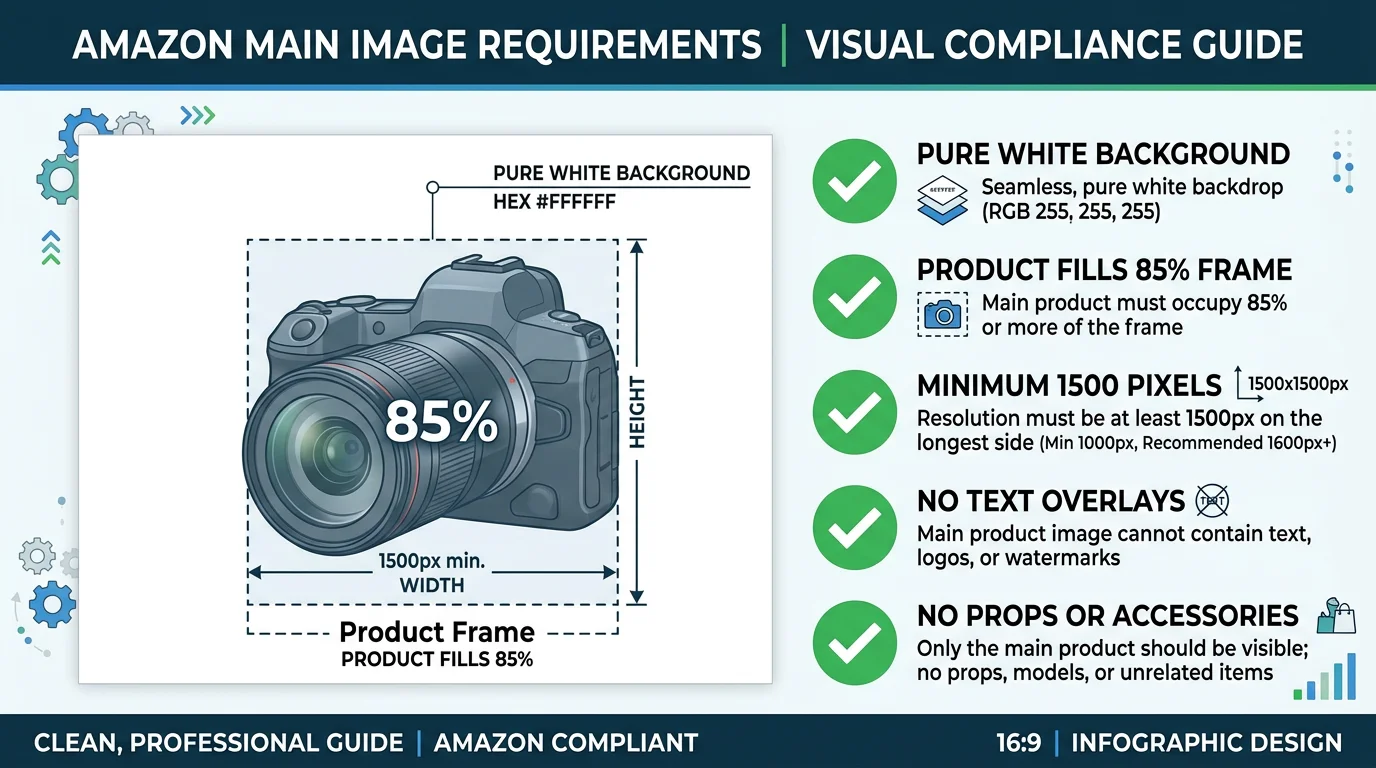
Pure White Background — #FFFFFF Exactly
The most commonly cited and most commonly violated rule: the main image background must be pure white. Not off-white. Not ivory. Not light gray. Not the near-white that a camera produces when photographing against a white foam board under warm studio lights. Pure white, defined as RGB value 255, 255, 255 — hex code #FFFFFF.
Amazon's automated image-quality systems scan the background pixel values of uploaded main images. A background at RGB 253, 250, 248 — barely perceptible as off-white to the human eye — can register as non-compliant and trigger a suppression flag. This is one of the leading causes of unexpected listing suppression for sellers who believe their images look white on screen.
Professional photographers address this in post-processing by selecting and replacing the background. AI tools like FlowPic generate the background at the correct value algorithmically, guaranteeing #FFFFFF output on every render.
Product Fills at Least 85% of the Image Frame
The product itself — not packaging, not props, not shadows — must occupy at least 85% of the image frame. This rule exists to ensure shoppers can see what they are buying at thumbnail size. A product floating in a large white field is hard to evaluate at 200 pixels wide and performs poorly in A/B testing against properly scaled alternatives.
Many sellers under-fill the frame because they are working from lifestyle or trade-show photos where the product was captured in context. Cropping those photos to meet the 85% fill requirement often introduces quality loss or awkward framing. Starting with a purpose-built product image — one rendered or photographed specifically to fill the frame — avoids the problem entirely.
Minimum 1,000 Pixels on the Longest Side (1,500px+ Recommended)
Amazon requires a minimum of 1,000 pixels on the longest side to enable the zoom feature on the product detail page. Zoom is consistently associated with higher conversion rates across categories — shoppers who zoom on an image have higher purchase intent than those who do not. Amazon's own seller documentation recommends 1,500 pixels or larger to ensure the zoom experience is crisp and detailed. For high-consideration purchases in categories like electronics, kitchen, or beauty, 2,000 pixels or more is advisable.
Images below 1,000 pixels on the longest side will not trigger the zoom feature. Images that technically meet the 1,000px floor but were upscaled from smaller originals will appear blurry when zoomed. Native resolution at 1,500px or above is the correct approach.
No Text Overlays, Watermarks, or Graphics
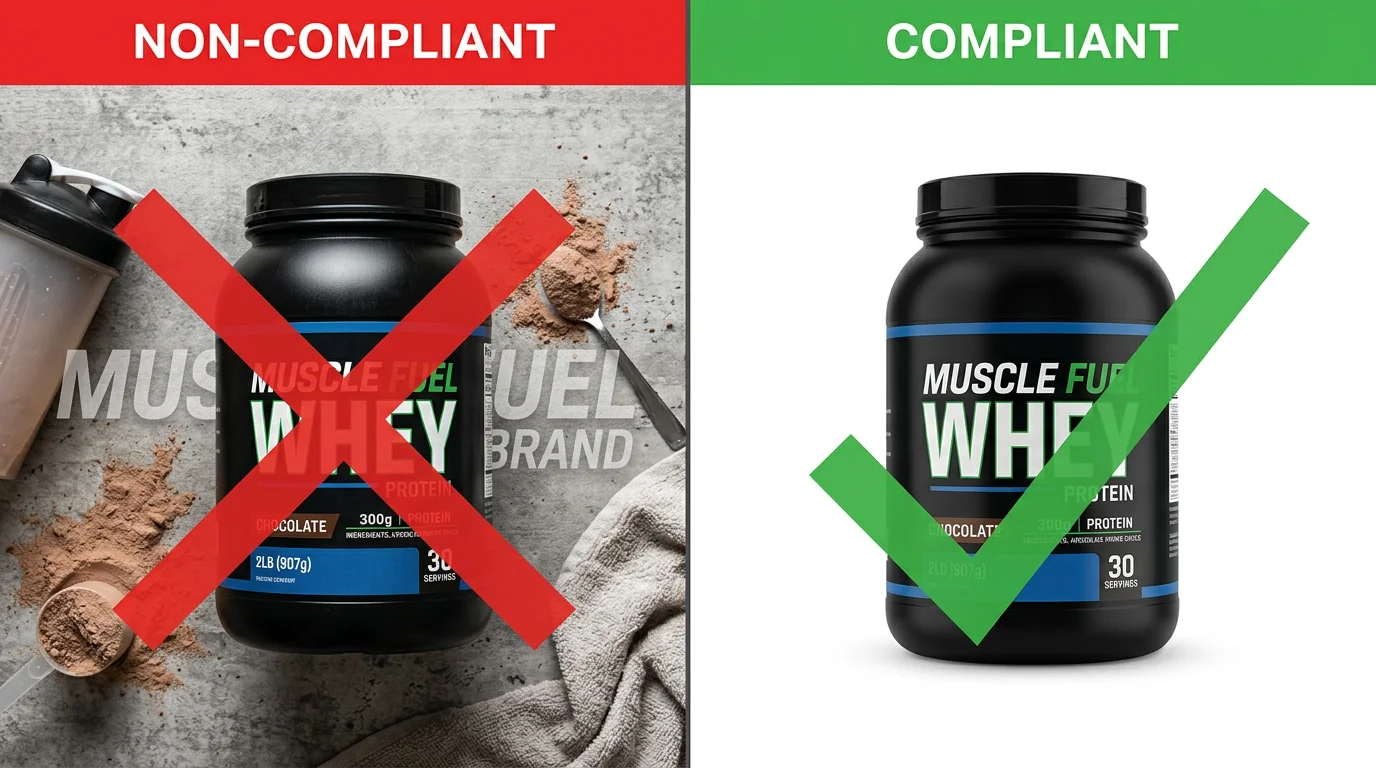
The main image must show only the product. No text describing features, no "New!" banners, no brand watermarks, no promotional badges, no borders or frames, no colored backgrounds in any region of the image. The only exception is text that is printed directly on the product or its retail packaging — a product label, for example, is permissible because it is physically part of the item being sold.
No Props, No Human Models (Most Categories)
Props — lifestyle items placed near the product to provide scale or context — are not permitted in the main image for most categories. A kitchen knife photographed on a cutting board with herbs in the background is a secondary image, not a main image. The main image shows only the knife against a pure white background.
Human models are similarly prohibited for most categories. The apparel and clothing category is the primary exception, discussed in the category-specific section below.
Accepted File Formats and Naming
Amazon accepts JPEG (.jpg or .jpeg), TIFF (.tif or .tiff), GIF (.gif), and PNG (.png) formats. JPEG is the standard for product photography. File names must follow the convention: ASIN.jpg (or other extension), where ASIN is the product's Amazon Standard Identification Number. Files uploaded through Seller Central or via catalog feeds are matched to listings by ASIN.
Full Compliance Table: Amazon Rule vs. FlowPic Handling
The table below maps every core Amazon main image requirement to the exact mechanism FlowPic uses to satisfy it automatically.
| Requirement | Amazon Rule | How FlowPic Handles It Automatically |
|---|---|---|
| Background color | Pure white, #FFFFFF (RGB 255, 255, 255) — no exceptions | All main-image renders output a mathematically pure #FFFFFF background, guaranteed at the pixel level |
| Product fill | Product occupies 85% or more of the image frame | AI layout engine scales and positions the product to fill 85–92% of frame by default; adjustable per listing |
| Minimum resolution | 1,000px minimum on longest side; 1,500px+ recommended | Default output resolution is 2,000 × 2,000px; configurable up to 4,000px for print-quality needs |
| Text overlays | No text, graphics, watermarks, or banners on main image | Main-image mode renders product and background only — no text layer is composited |
| Props | No props permitted on main image | Main-image mode strips all non-product elements from the scene |
| Human models | No human models (except apparel category) | Model shots are generated separately and tagged as secondary images; never output as main-image default |
| Packaging | Show the item as sold; include packaging only if it is part of what the customer receives | User specifies whether to include or exclude retail packaging; both options render correctly |
| File format | JPEG, TIFF, GIF, or PNG; JPEG recommended | Default export is JPEG at 95% quality; PNG export available for transparent-background secondary images |
| Multiple views | Main image shows front view; additional views belong in secondary slots | Renders are labeled by angle (front, back, side, 3/4); front view is flagged as main-image candidate |
Secondary Image Requirements
Amazon allows up to 8 additional images on a standard product detail page (more with A+ Content). Secondary images are subject to far more relaxed rules than the main image — and they are where sophisticated sellers differentiate their listings and increase conversion rate after the initial click.
What Is Permitted in Secondary Images
Secondary images may include lifestyle photography showing the product in use, infographic-style images with feature callouts and text overlays, scale reference images showing the product next to common objects, on-model photography for apparel and accessories, close-up detail shots highlighting materials or construction, before/after comparisons, and multi-pack or bundle arrangement shots.
The same technical minimums apply: 1,000px on the longest side, accepted file format, no watermarks that obscure the product. But backgrounds can be any color, props are allowed, people are allowed, and graphics are allowed.
Recommended Secondary Image Sequence
High-converting listings typically follow a consistent secondary image sequence: main white-background image (slot 1), lifestyle image in use (slot 2), feature infographic (slot 3), scale/size reference (slot 4), close-up detail (slot 5), social proof or UGC-style image (slot 6), and packaging/what's-in-the-box (slot 7 or 8). This sequence mirrors the information a shopper needs to move from awareness to purchase decision.
FlowPic generates all of these image types from a single product upload — white background for slot 1, lifestyle scenes for slot 2, UGC-style for slot 6 — in a single workflow. The average processing time from upload to download-ready images is under 60 seconds per product.
A+ Content Image Specifications
Amazon A+ Content (previously Enhanced Brand Content, available to Brand Registry members) supports a range of module types, each with its own image dimension requirements. Getting these wrong produces stretched, cropped, or blurry modules that undermine the premium experience A+ Content is designed to create.
Standard A+ Content Module Dimensions
The standard module image size is 970 × 600 pixels. This applies to the majority of A+ Content modules including comparison charts, image and text overlays, and four-image quadrant layouts. Images must be submitted at exactly this resolution — Amazon does not upscale smaller images; undersized images will appear pixelated or be rejected.
Full-Width A+ Content Banner
Full-width banner modules — the large hero images that span the entire content area at the top of A+ Content — require 1,464 × 600 pixels. These modules have the highest visual impact on the page and benefit most from professional-quality photography or AI-rendered lifestyle scenes.
Additional A+ Content Specifications
Individual product image modules within A+ Content typically accept square images at 300 × 300 pixels. Text-heavy modules with small image insets may use 220 × 220px thumbnails. Brand Story modules, introduced as part of A+ Brand Story, use a 315 × 415px portrait format for the brand card image. Always refer to the current A+ Content Manager within Seller Central for module-specific requirements, as Amazon updates these periodically.
Premium A+ Content (available to sellers with a Brand Story and brand store, meeting certain sales thresholds) supports additional module types with wider image dimensions and video integration. Premium A+ modules can display at up to 1,464px wide across all module types.
Category-Specific Photography Rules
While the general image requirements apply across all categories, several major Amazon categories have additional or modified rules. Sellers in these categories need to know the exceptions.
Apparel and Clothing
Apparel is the primary category where on-model photography is permitted — and often preferred — for the main image. Amazon allows either a pure white background ghost mannequin shot or an on-model image as the main image for clothing. On-model main images typically outperform ghost mannequin for conversion in the clothing category because shoppers want to see fit and drape. If using on-model photography, the model must be standing (not sitting or lying down) and the background must still be pure white (#FFFFFF).
For footwear, shoes must be photographed at a 45-degree angle facing left. For bags and accessories, the item must be shown closed and unfolded unless the item is designed to be displayed open.
Jewelry
Jewelry requires a clean background on the main image — #FFFFFF for most subcategories. No props are permitted on main images; a ring cannot be photographed on a velvet display stand, a necklace cannot be shown on a jewelry bust. The item must be shown alone. For fine jewelry with gemstones, Amazon recommends close-up detail images in secondary slots to highlight stone quality and setting.
Lifestyle images of jewelry being worn are appropriate for secondary slots and tend to perform well for conversion, but they do not belong in the main image slot.
Food and Grocery
Food products require a white or off-white background on the main image showing the product in its retail packaging. Unlike most categories, food allows "off-white" in the sense that natural food staging surfaces (white marble, white linen) are sometimes accepted — but the safest interpretation remains pure #FFFFFF. Lifestyle images showing prepared food or food in use are strongly encouraged for secondary image slots, where they consistently drive higher conversion by making the product appealing and helping shoppers envision using it.
Multi-packs or variety packs must show all included items on the main image. If a product comes in a 4-pack, all 4 units must be visible.
Electronics and Automotive
Electronics follow the standard rules strictly: pure white background, no props, product only. For products with screens (phones, tablets, monitors), the screen may show a non-distracting lifestyle image or the device's default interface — a blank black screen is not required. For automotive parts, the part itself must be shown clearly, not installed on a vehicle, in the main image.
Health and Beauty
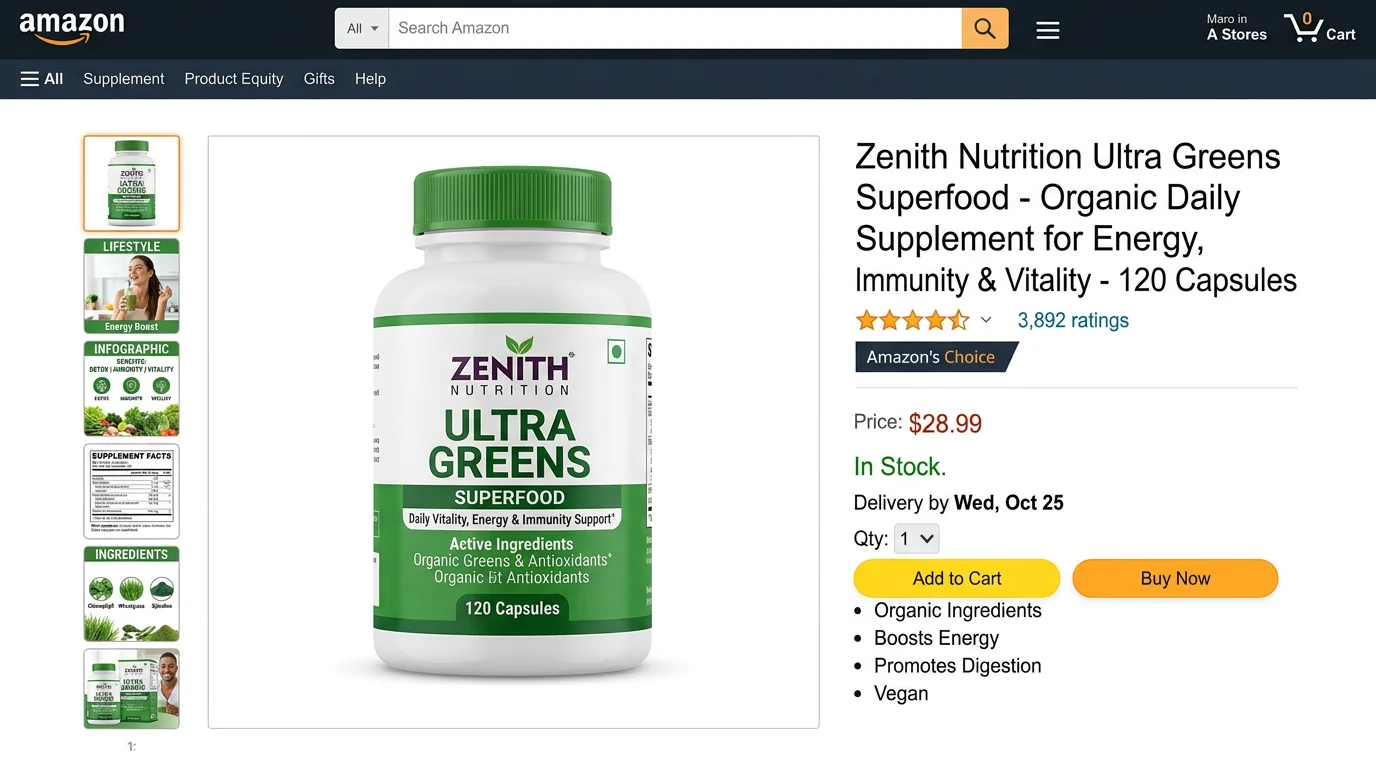
Health and beauty products must show the item in its retail packaging on the main image. For supplements, the front label must be clearly legible. For skincare and cosmetics, the product should be shown closed and upright. Before/after images are regulated under Amazon's advertising policies and are generally not permitted even in secondary images unless the claims are substantiated and the imagery meets strict guidelines.
Common Rejection Reasons (And How to Avoid Them)
After reviewing thousands of Amazon listings, the same image errors appear repeatedly. Here are the most common causes of main image rejection and suppression, and the specific fix for each one.
Background Is Off-White, Not Pure White
This is the most common rejection cause. A product photographed against a white studio backdrop will almost always produce a background in the range of RGB 240–252 rather than the required 255, 255, 255. The fix is not to buy a brighter backdrop — it is to replace the background in post-processing or to use an AI tool that renders the background at the correct value. The #FFFFFF requirement is absolute, and manual editing of physical photography backgrounds is the main source of variation. FlowPic eliminates this variable entirely by generating the background computationally.
Product Is Too Small in the Frame
Products occupying 60–75% of the frame are common in listings where the seller used an existing catalog photo or trade-show image cropped down to square. The fix is to re-photograph or re-render specifically for the main image slot, with product scale as an explicit target. Cropping an existing image more aggressively sometimes helps but often introduces blurriness at the enlarged scale. Purpose-built renders that target 85–90% fill from the start avoid this entirely.
Logo or Text Overlay on the Main Image
Brand logos, "Amazon's Choice" badges added by a designer, "Buy 2 Get 1 Free" banners, feature text — all of these are rejected on main images. This error typically comes from using a promotional or advertising creative asset as the main image. The main image must be the product only. All text and graphics belong in secondary image slots 2 through 8 or in A+ Content modules.
Props in the Main Image
A kitchen scale photographed with measuring cups and herbs. A supplement bottle photographed with fruit and a measuring tape. A phone case photographed inside the phone. These are all main image violations because they include props. The product must stand alone on the white background. Move these creative setups to secondary image slots where they convert well.
Low Resolution or Upscaled Images
Images that were originally 600 × 600px and upscaled to meet the 1,000px minimum appear blurry at zoom. Amazon's zoom feature requires native resolution, not interpolated pixels. Always start from a source file or render at 1,500px or higher. A 2,000 × 2,000px JPEG at 95% quality is the standard for professional Amazon listings in 2026.
Incorrect Aspect Ratio
Amazon accepts square (1:1) and near-square aspect ratios for main images. The recommended format is square. Non-square images — a product photographed in landscape and uploaded without cropping — will be resized by Amazon's system in ways that may not center the product correctly. Submit square images at 2,000 × 2,000px for full control over how your main image displays.
How FlowPic Generates Amazon-Compliant Images in 60 Seconds
The traditional path to Amazon-compliant product photography involves hiring a photographer ($150–500 per product), booking a studio, shipping samples, waiting for the shoot, waiting for retouching, and waiting for delivery — a process that typically takes 2 to 4 weeks and costs several hundred dollars per SKU. For FBA sellers managing dozens or hundreds of products, this workflow is not just expensive; it is a bottleneck that delays launches and eats into margins.
FlowPic collapses that workflow into three steps.
Step 1: Upload Your Existing Product Photo
Start with any photo of your product — a supplier's catalog image, a smartphone photo, an existing listing photo. FlowPic's AI engine isolates the product from whatever background it was photographed against, regardless of whether that background was white, cluttered, or outdoors. The product isolation step runs automatically without manual masking or selection.
Step 2: Select Your Output Type
Choose what you need: a main image with pure white background, a lifestyle scene with a specified setting and mood, an on-model shot for apparel, a UGC-style photo that looks organically captured, or a product video ad. Each output type is engineered to meet the appropriate Amazon image slot requirements. Main images are rendered at #FFFFFF with 85–92% product fill and 2,000 × 2,000px resolution by default.
Step 3: Download and Upload to Seller Central
Processing takes under 60 seconds. Download your images as JPEG or PNG, name them according to the ASIN.jpg convention, and upload them directly to your Seller Central listing. No post-processing required. No background correction. No resolution adjustment. The images come out compliant.
For FBA sellers running 50 or more SKUs, FlowPic supports bulk upload — process an entire catalog simultaneously rather than one product at a time. A catalog of 100 products that would take weeks to photograph traditionally can be processed in an afternoon.
Beyond compliance, FlowPic generates the secondary images and A+ Content visuals that move the needle on conversion. Lifestyle scenes, UGC-style images, and feature infographic backgrounds — all from the same initial product upload, all sized to Amazon's exact specifications per image slot.
If you are launching a new product, re-photographing an underperforming listing, or auditing a catalog that has accumulated compliance risk over time, FlowPic is built specifically for this workflow.
Frequently Asked Questions
What exactly counts as "pure white" for Amazon main images?
Amazon requires RGB 255, 255, 255 — hex code #FFFFFF — for the main image background. This is mathematically pure white with no color cast. Any value below 255 in any of the three RGB channels can register as off-white in Amazon's automated compliance check. Standard studio photography against a white backdrop typically produces backgrounds in the RGB 240–252 range, which requires post-processing correction. AI-generated backgrounds like those produced by FlowPic are rendered at exactly #FFFFFF from the start.
Can I use the same main image for multiple product variants?
Each ASIN has its own main image. If you sell a product in five colors, each color variation has its own ASIN and should have its own main image showing that specific color on a white background. Sharing a single image across color variants — showing a blue product on a listing for a red variant, for example — is a policy violation and misleads customers, which Amazon treats as a significant quality issue. Generate a separate main image for each color, size, or style variant.
Does Amazon's zoom feature really affect conversion rates?
Yes, meaningfully. Amazon's own seller resources have noted that listings with zoom-enabled main images (requiring 1,000px minimum, with 1,500px+ recommended for quality) consistently show higher conversion rates than listings below the zoom threshold. The mechanism is straightforward: shoppers who zoom are evaluating the product seriously. A crisp, detailed zoom experience removes doubt. A blurry or unavailable zoom experience introduces doubt and correlates with higher bounce rates back to search results.
What happens if my main image is rejected by Amazon?
Amazon typically sends a notification through Seller Central when a main image is flagged as non-compliant. In some cases the listing is suppressed — removed from search results — immediately. In others, you receive a warning with a grace period (typically 14 days) to correct the image before suppression. Either way, the fix requires uploading a compliant replacement image and waiting for re-indexing, which takes 24 to 72 hours. During that window, the listing may have reduced or zero visibility in search results. Preventing suppression through compliant images from the start is significantly less costly than fixing suppression after it occurs.
Are there Amazon image requirements specific to brand-registered sellers?
Brand Registry unlocks additional image capabilities — specifically A+ Content, Premium A+ Content, and Brand Story — but does not change the core main image requirements. All Brand Registry sellers must still meet the same main image standards as non-registered sellers: #FFFFFF background, 85% product fill, 1,000px minimum, no text or props. Brand Registry does give sellers access to the A+ Content image slots, which are governed by the module-specific dimension requirements (970×600px standard, 1,464×600px full-width banner) described earlier in this guide.
Conclusion
Amazon's product photography requirements are stricter than any other major ecommerce platform — and Amazon enforces them through automated systems that do not give sellers the benefit of the doubt. A background that is 99% white is not compliant. A product filling 80% of the frame instead of 85% is not compliant. A brand logo in the corner of the main image is not compliant.
The sellers who win on Amazon understand that main image compliance is the floor, not the ceiling. A compliant main image gets you into the game. A compelling main image — sharp, well-scaled, visually distinctive against competitor thumbnails in the same search results — is what drives click-through and starts the conversion flywheel.
The good news is that in 2026, you do not need a photography budget or a production timeline to produce compliant, high-converting Amazon product images. FlowPic generates pure white background main images, lifestyle secondary images, on-model shots, UGC-style photos, and A+ Content visuals from a single product upload — all sized to Amazon's exact specifications, all processed in under 60 seconds per product.
If you are launching a new listing, relaunching an underperformer, or working through a catalog audit, the fastest path to compliant, conversion-optimized images runs through FlowPic.