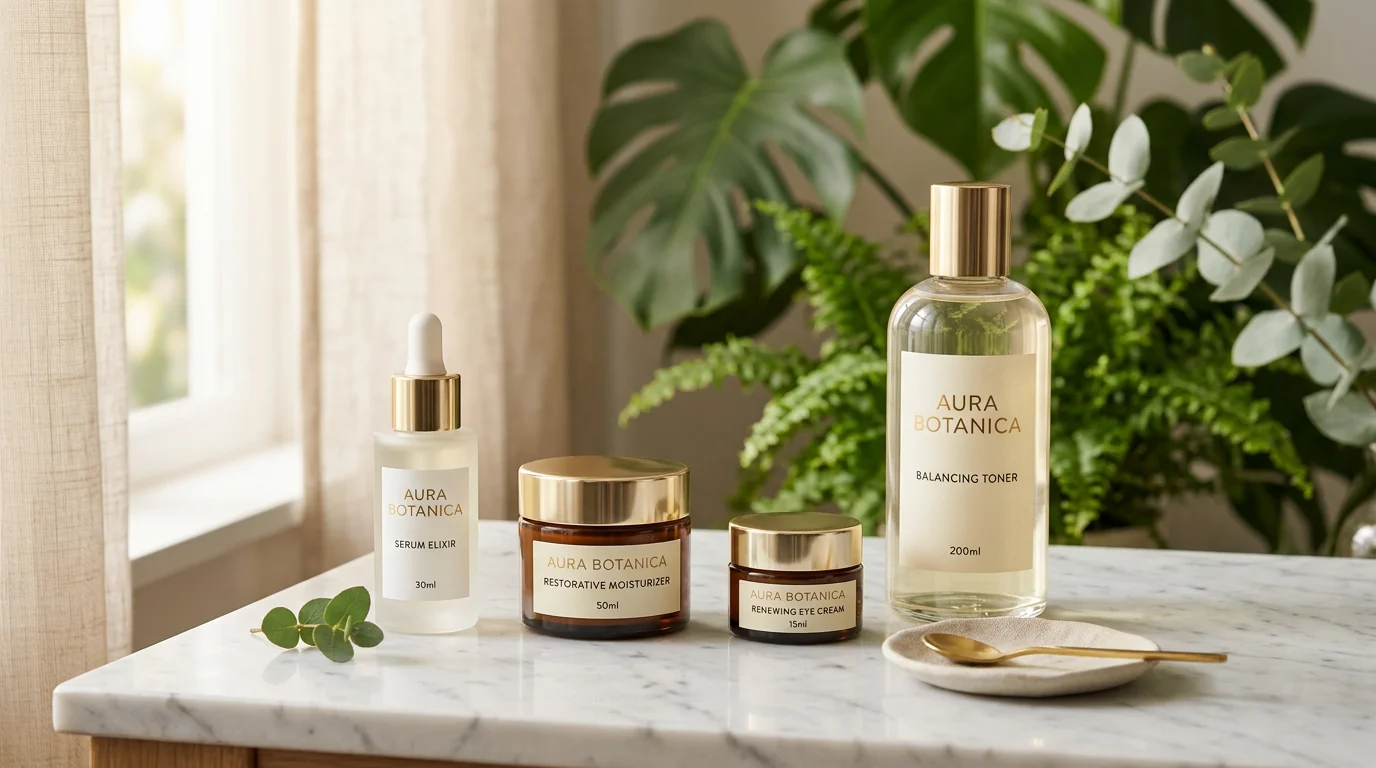
Skincare is one of the most visually demanding product categories in ecommerce. Consumers buy skincare with their eyes first—they're looking for signals of quality, efficacy, and brand sophistication before they read a single ingredient. A blurry photo or amateur packaging shot against a cluttered background immediately communicates the wrong message.
The problem: professional skincare photography is expensive. A skincare brand launch requires 5–8 images per SKU across 3–5 products—that's 15–40 professionally photographed images before you've sold a single unit. At $80–$150 per edited image from a product photographer, that's $1,200–$6,000 for launch imagery alone, and more as you add SKUs or refresh your visual identity.
AI skincare product photography changes this calculus entirely. FlowPic generates professional skincare imagery from a phone photo in under 60 seconds—clean white backgrounds for Amazon, aspirational lifestyle scenes for Instagram, on-model shots for beauty blogs, all at a fraction of the traditional cost.
What skincare product imagery converts
Skincare photography that drives sales has three characteristics:
1. Cleanliness and minimalism
The most effective skincare visuals use negative space. White, cream, pale pink, and sage green backgrounds signal purity and simplicity—values that translate directly to the product's efficacy promise. Cluttered or busy backgrounds create visual noise that undermines the perception of quality.
2. Premium material textures
Marble, frosted glass, linen, light wood, concrete—lifestyle backgrounds that evoke quality materials signal premium positioning. A moisturizer on a marble countertop costs $2,000 to shoot traditionally. AI generates the same image in seconds.
3. Skin-on-product shots
The highest-converting skincare imagery shows the product being applied—a serum dropper held above a palm, a moisturizer being smoothed onto a forearm. These shots communicate "this is for your skin" more effectively than any copy. AI model shots generate these without hiring models or photographers.
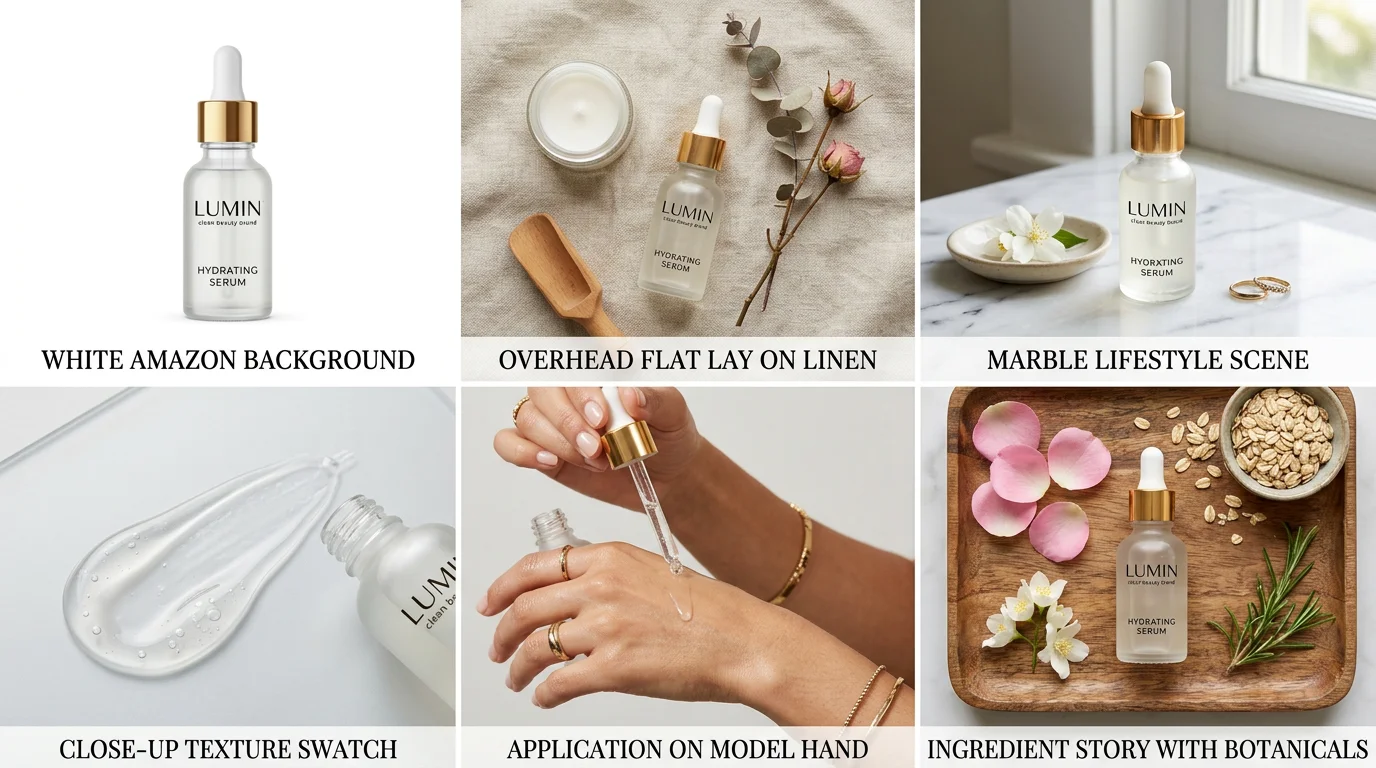
Essential shot types for skincare brands
White background / Amazon hero
Pure white (#FFFFFF) background with the product centered, filling 80–85% of the frame. Required for Amazon; also useful as the primary catalog image on Shopify and wholesale B2B portals. This image must be photorealistic—AI generates Amazon-compliant white background shots from any source photo.
Flat lay / overhead
Products arranged from above on a styled surface: marble slab, white cotton cloth, ceramic tray, or a combination of materials. Flat lay photography performs exceptionally well as the first image in Etsy listings and Instagram grid posts. AI generates consistent flat lay compositions across your full product range.
Lifestyle scene
Products placed in their use environment: bathroom shelf with morning light, vanity counter with soft lamp glow, nightstand with candlelight. The scene should match your brand aesthetic. AI allows you to test 10 different lifestyle backgrounds in the time it would take a photographer to set up one.
On-model / application shot
Product being applied to skin, in hand, or used in a beauty routine context. These require either real models (expensive) or AI model generation. For skincare specifically, these drive the highest engagement on social and have the highest click-through rates in paid ads.
Detail / texture shot
Close-up of the product itself—the texture of a cream, the color of a serum, the finish on a matte bottle. These give shoppers the tactile information they'd normally get in-store and reduce return rates significantly.
Ingredient story shot
Product alongside its key ingredients—a vitamin C serum next to orange slices, a retinol cream alongside a rose hip. These work exceptionally well for Instagram and Shopify landing pages where you want to communicate the product's natural/science credentials.
AI skincare photography workflow
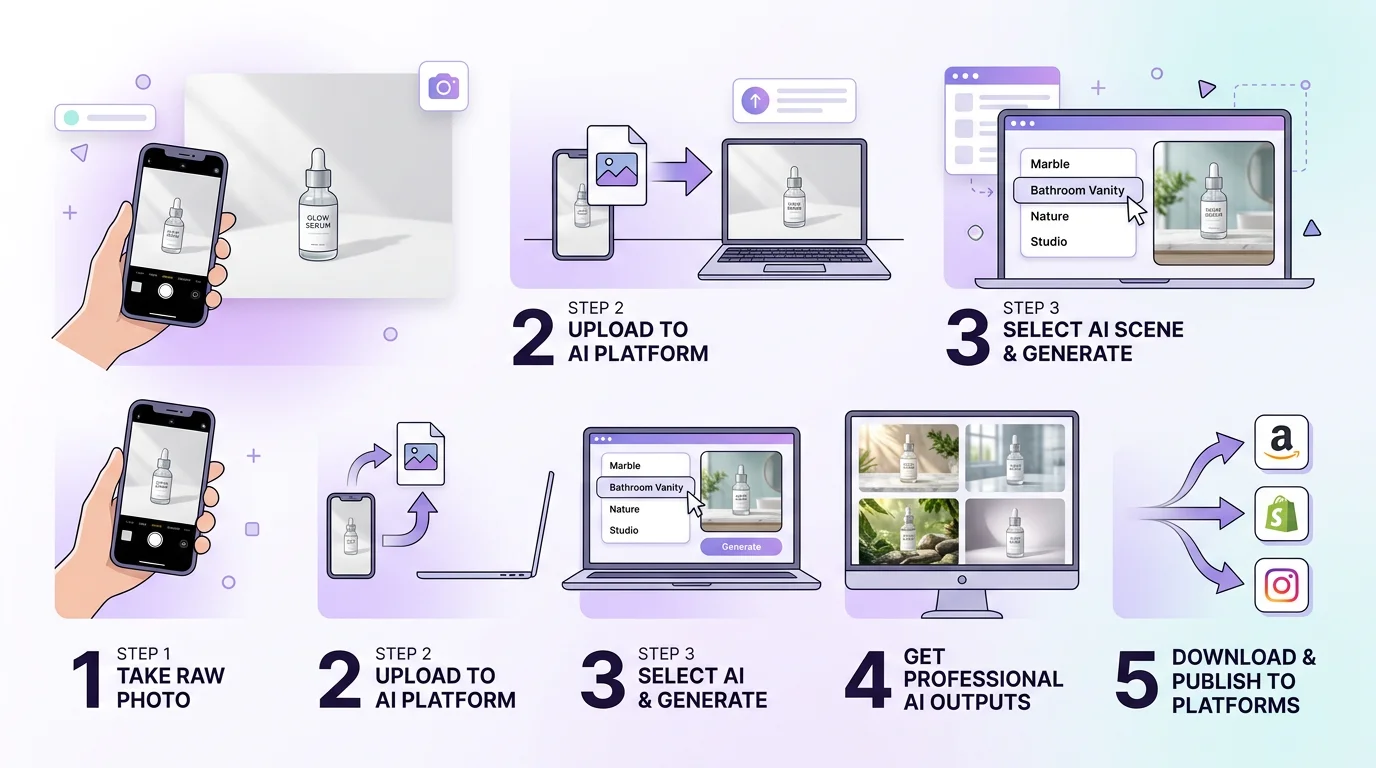
The complete workflow with FlowPic:
-
Photograph your packaging
Use your phone in natural window light. Place products on a white surface. Shoot front-facing and three-quarter angle. For serums and bottles, include a top-down shot. Quality of source photo determines output ceiling—bright, clear source images produce the best results. -
Upload to FlowPic
Upload all product angles at once. FlowPic processes each image, removes the background, and prepares variants for generation. Support for JPG, PNG, HEIC (iPhone). -
Select output type and scene
For each product, generate the full set: (a) white background for Amazon/retailer portals, (b) 2–3 lifestyle scenes for Instagram and Shopify, (c) one flat lay for Etsy and Pinterest, (d) one on-model application shot for paid ads. -
Generate video ads
Use the image-to-video feature to create 6–15 second product reveal clips. Skincare brands see strong performance with the "product reveals from misty scene" format for Instagram Stories and TikTok. -
Export and distribute
Download in platform-specific formats. Amazon: 2,000 × 2,000px JPEG. Shopify: 2,048 × 2,048px. Instagram: 1,080 × 1,080px (square) or 1,080 × 1,350px (portrait). TikTok/Stories: 1,080 × 1,920px.
Platform specs for skincare photography
Amazon skincare photography requirements
- Main image: white background, single product, no text or graphics
- Resolution: 2,000 × 2,000px (enables product zoom)
- Alternate images: up to 9; lifestyle, ingredient story, and model-application shots recommended
- A+ Content: brand-registered sellers can add full-width lifestyle banners (enhanced brand pages)
Sephora / Ulta marketplace requirements
- White background, multiple angles required (front, back, open/closed if applicable)
- Minimum 1,500 × 1,500px; 2,000 × 2,000px preferred
- No text overlays on product images
DTC brand website (Shopify)
- 2,048 × 2,048px product images for grid view; lifestyle hero images at 1,440 × 900px for banners
- Mix of white background (product cards), lifestyle (featured section), and application/model shots (product page)
Instagram and TikTok
- Feed posts: 1,080 × 1,080px (square) or 1,080 × 1,350px (portrait)
- Stories / TikTok: 1,080 × 1,920px vertical
- Reels: 1,080 × 1,920px; video 3–30 seconds
- Style tip: lifestyle and application shots outperform white backgrounds on Instagram—save clean product shots for your Shopify grid
5 tips for excellent AI skincare photos
-
Photograph against white, not black
Dark backgrounds make background removal harder and color inaccurate for AI generation. A white surface reflects light evenly and gives AI the most accurate product color data. -
Include all packaging elements
If your product has a cap, pump, or dropper, photograph it with these attached—not separately. The complete product form is what shoppers recognize. -
Generate a consistent background across your full range
Your Shopify collections page should show all products on the same background with consistent lighting direction. AI makes this easy—generate all SKUs on the same marble background, for example, and your store instantly looks cohesive. -
Test aspirational vs. clinical positioning
Skincare brands sit on a spectrum from aspirational/luxury (spa-like, editorial) to clinical/science (clean, minimal, white-lab). Generate variants in both aesthetics and run split tests in paid ads before committing your brand identity. -
Create seasonal variants proactively
Summer skincare photography (light, bright, outdoor-inspired) and winter skincare photography (warm, cozy, indoors) each perform at different times of year. Generate both sets in one session.
AI vs. traditional skincare photography: cost breakdown
| Factor | Traditional Studio | FlowPic AI |
|---|---|---|
| Day rate (photographer + stylist) | $2,000–$4,000 | Subscription from $19/month |
| Images per session | 15–30 final images | Unlimited |
| Lifestyle scene change | New full-day shoot | 60 seconds |
| On-model shots | Model: $300–$800/day | Included |
| 5-product launch set (5 images each) | $5,000–$15,000 | $20–$100 |
| Seasonal refresh (existing products) | Full reshoot required: $2,000+ | Instant, no additional cost |
| Video ads | Videographer: $1,500–$5,000 | Included with image generation |
Frequently asked questions
Do AI-generated skincare photos look professional enough for luxury brands?
AI skincare photography has reached a quality level that is indistinguishable from traditional photography for 85–90% of use cases—Amazon listings, Instagram content, Shopify product pages, and paid ads. For ultra-luxury brands with rigid editorial standards (Chanel, La Mer-level campaigns), traditional photography still defines the benchmark. For most DTC and emerging skincare brands, AI quality exceeds what most consumers can distinguish.
Can AI generate photos that show cream texture?
Yes, though results vary. Swatched texture shots (cream spread across the back of a hand or on a flat surface) work well with AI generation. The key is providing a clear source image that shows your product's actual texture. AI enhances what's there—it works from your product, not a generic template.
How do I make my AI skincare photos look consistent across a product range?
In FlowPic, generate all products using the same scene description and style settings. The AI maintains consistent lighting, perspective, and background styling across your full range when you use consistent inputs. This produces catalog-level visual consistency at a fraction of the studio cost.
Can AI photography help with Amazon A+ Content and brand stores?
Yes. Amazon A+ Content and Brand Stores require a variety of image formats: full-width banners (1,464 × 600px or 1,464 × 625px), module images, and lifestyle shots with text overlay space. FlowPic generates images at any custom dimension, including A+ Content formats, giving brand-registered sellers the visual assets they need for enhanced brand pages without an agency.
What file format should I export AI skincare photos?
JPG for Amazon and most marketplace submissions (compressed, smaller file size). PNG for Shopify product images (lossless quality) and anywhere you need transparent backgrounds (overlay compositions, A+ Content). For paid ads, export both JPG (static) and MP4 (video) to enable A/B testing static vs. video in your Meta and TikTok campaigns.
Generate professional skincare product photos in 60 seconds
One source photo → white background, lifestyle scenes, on-model shots, and video ads.
Try FlowPic Free →